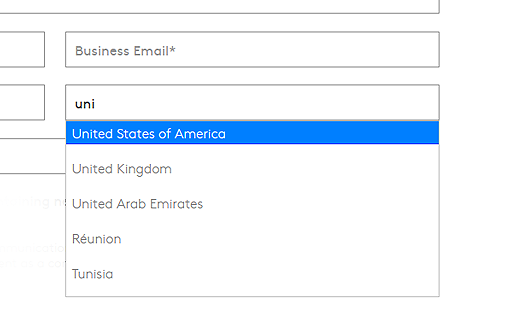
Sales Forms Country Selection feature.
My Roles:
Concept, design, development
Tools:


Project Overview:
On CoStar’s global marketing web pages, the previous lead capture process faced challenges due to incorrect or incomplete information being entered into the sales capture forms. This was caused by a lack of proper validation and a limited number of countries to select from, even though the website served a global audience. To address this, I added a comprehensive country selection list paired with an autocomplete feature to streamline the form-filling process, along with light validation that improved the quality of leads and location data captured.
Discovery.
I got into the data and noticed that Visitors from literally all over the world were requesting info while there were only three options to select from - America, Canada and United Kingdom.
For example (As seen in the data visualisation on the right) 324 demo requests from India, 296 from Nigeria, 61 from Hong Kong, 45 from Australia, 37 from South Africa, all within a month! And even though CoStar didn’t offer services in most of those countries, we still needed to somehow acknowledge these visitors, and at least make the process less frustrating.

After some light research I stumbled across an interesting study by Christian Holst, about the many usability issues involving massive country selector drop-downs. Some of these being:
01: Lack of overview
A list of 249 countries can be quite bewildering
02: Unclear sorting
Sorting logic usually shows the top 5 most popular countries at the top, and is unclear at first glance
03: Scrolling issues
Drop-down menus with many options cause scrolling problems that either hide the menu or result in accidental incorrect selections, depending on the browser.
04: Inconsistent UI
Drop downs look and work differently on various browsers and devices causing inconsistencies
05: Lack of context
Mobile screens have very limited screen real estate
06: Breaking the flow
Using a mouse with these large lists slows progress
Solution.
Along with this article, there was a brilliant open-source plugin that addresses all these issues by creating an auto-complete country selection field. Instead of selecting your country from a list, you simply type it in — which also resolves potential issues with the typing function. For example, it auto-completes various spellings of the same country. You might call the Netherlands “Holland,” for instance, or type an acronym such as “U.S.A.” for the United States of America or “UK” for the United Kingdom. These all auto-complete to input our standard country codes, helping us collect accurate location data.